
Firefox 4.0b7pre:タイトルバー上にタブバーを表示する ― 2010/09/28 00:00
メニューバーをタイトルバー上に表示する - Grieverを見ながら自分好みにカスタマイズしてみました。
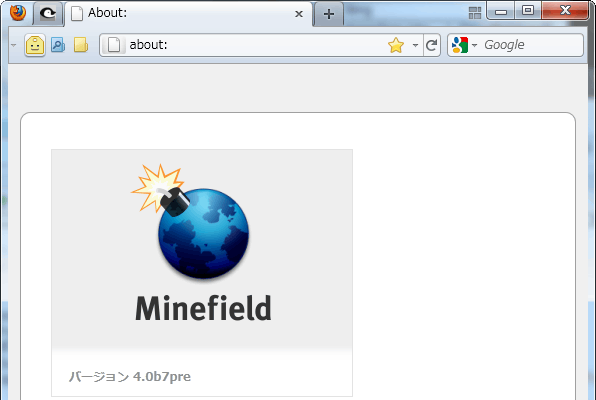
実際よく分かってないからuserChrome.cssを切り貼りしてるだけ……

とここまではいいのですが、「ALT」でメニューを表示すると悲しいことに……

メニューはクリックできるのでキニシナイ……
でも「メニューバー」をオンにするとさらに悲惨に……
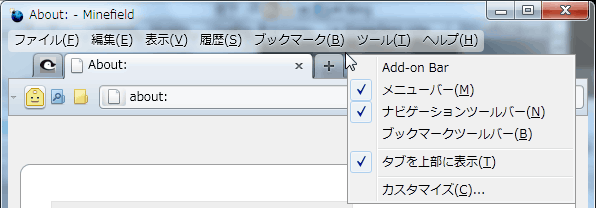
それは使わないからキニシナイ……
「タブを上部に表示」をオフにすると目も当てられないけど、それはしないからキニシナイ……orz
/* タイトルバー上にタブバーを表示 */
#main-window[chromemargin]:not([inFullscreen="true"]) #navigator-toolbox:not([customizing="true"]) {
  margin-top:-30px !important;
}
#main-window[sizemode="maximized"] #navigator-toolbox{padding-top:6px !important;}
#main-window[chromemargin]:not([inFullscreen="true"]) #TabsToolbar{
  margin-left:24px !important;
  margin-right:103px !important;
}
#main-window[chromemargin] #appmenu-button{
  background: transparent no-repeat center center url("moz-icon://file:///C:/Program Files (x86)/Mozilla Firefox/firefox.exe?size=16") !important;
  border: none !important;
  min-width: 20px !important;
  max-width: 20px !important;
  min-height: 20px !important;
  max-height: 20px !important;
  padding: 2px !important;
  margin: 2px 0 0 0 !important;
  -moz-box-shadow: none !important;
}
#main-window[chromemargin]:not([inFullscreen="true"]) #appmenu-button .button-text,
#main-window[chromemargin]:not([inFullscreen="true"]) #appmenu-button .button-menu-dropmarker {
  display: none !important;
}
#main-window[chromemargin]:not([inFullscreen="true"]) #appmenu-button-container,
#main-window[chromemargin]:not([inFullscreen="true"]) #titlebar-buttonbox,
#main-window[chromemargin]:not([inFullscreen="true"]) #tabview-button,
#main-window[chromemargin]:not([inFullscreen="true"]) #tabbrowser-tabs,
#main-window[chromemargin]:not([inFullscreen="true"]) #new-tab-button,
#main-window[chromemargin]:not([inFullscreen="true"]) #toolbar-menubar > * {
  position: relative !important;
  z-index: 10 !important;
}
タブ表示上下位置調整の通常時(-30より-20くらいが勝手は良い)と最大化時Firefox ボタンアイコン避け
ウインドウボタン(クローズなど)避け
Firefox ボタンの代わりに表示するアイコン
ちょこっと修正(10/09)
またちょこっと修正(10/13)
関係ありそうな……タブバーを細くしてみた


最近のコメント